


Ear Agent Live : Hearing Aid
4.7262.00 Reviews
App Specs
- Version
- 6.1.0
- Updated On
- License
- Free
- Downloads
- 500,000+
- Developer
- One Music Player
- Categories
- Communication
- Platform
- Android
Screenshots
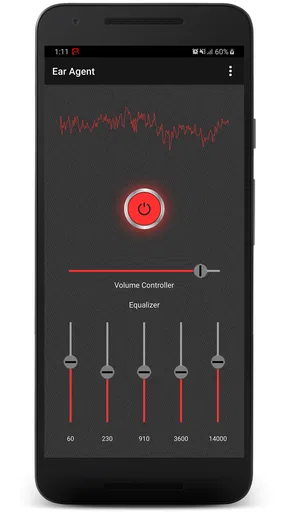
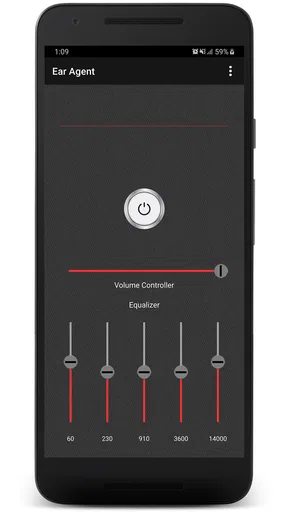
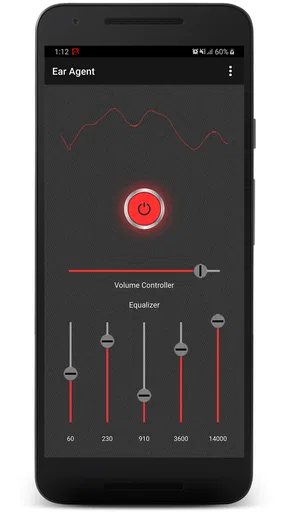
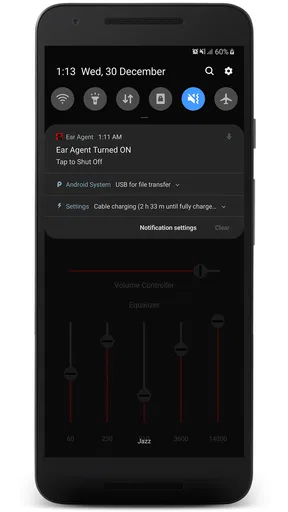
 Analysis by AppCompare
I approached Ear Agent Live: Hearing Aid as a practical communication app rather than a replacement for medical hearing equipment. Its basic idea is easy to understand: use a phone’s microphone to pick up nearby sound and make listening more noticeable through connected audio equipment. That can be useful in the right setting, especially when I want help following a quiet conversation, but it also requires realistic expectations. A phone is not automatically a professionally fitted hearing aid.
The app is made by One Music Player and sits in the Communication category. It is free to download, with optional in-app purchases ranging from $0.99 to $99.99 per item. It has reached over 500 thousand installs and holds a 4.7 average from around 4.2 thousand ratings, which suggests that many people find the concept appealing. My own view is more measured: this is an interesting listening aid for occasional situations, but its value depends heavily on the phone, headphones, surroundings, and the user’s hearing needs.
How the current version feels in everyday use
The current version is 6.1.0, and it runs on Android 8.0 or later. That makes it accessible to people using older Android phones, although compatibility on paper does not guarantee the same experience on every device. Microphone quality, audio processing, Bluetooth behavior, and the type of headphones connected can all change how useful the app feels.
When I think about the best use case, I picture a quiet room rather than a busy street. Imagine sitting across from a family member in a softly lit living room while the television is turned down. Placing the phone on a table between us and using headphones can make the conversation easier to follow. The phone becomes a listening point, and I can adjust my position instead of constantly asking the other person to repeat themselves.
That setup also reveals the first important trade-off. The phone must be positioned sensibly. If it is inside a pocket, across the room, or covered by a case that interferes with the microphone, the result will not be comparable to placing it near the person speaking. I found that a small change in phone placement can matter more than repeatedly changing settings. For occasional conversations, this simple workflow is more practical than treating the app as something that should run unnoticed all day.
The app’s store summary uses energetic language about powering up your ears, but I would not interpret that as a promise of clinical correction. The useful question is not whether it can turn a phone into a medical device. The useful question is whether it can provide extra listening assistance during a specific moment. For some users, that distinction will determine whether the experience feels helpful or disappointing.
Who is likely to benefit
I can see this app helping someone who occasionally struggles with soft speech, wants to hear a nearby conversation more clearly, or is testing whether amplified phone audio might be useful before considering dedicated equipment. It may also suit a person who already carries a phone and headphones and wants a quick experiment without buying hardware immediately.
Worth Reading Before You Choose

EA SPORTS FC Mobile 26 Is a Bigger Football Game, but It Takes Time

Flipboard Shows What News Apps Must Do Beyond the Feed

Switching to Android Auto Means Rethinking Your Driving Routine

Google Calendar Makes a Crowded Week Easier to Manage

Ludo King Makes the Most of the Minutes Between Plans

Baby Panda World Brings Quick Play to Modern Phones, but Its Game Library Feels Busy
It is less suitable for someone who needs dependable hearing support throughout the day, precise frequency correction, or a discreet device designed specifically for hearing loss. It is also a poor choice for situations where delayed audio, microphone handling, or environmental noise could create confusion. A phone-based tool has more moving parts than a purpose-built hearing aid, and those differences matter when reliability is essential.
The Everyone age rating makes the app broadly approachable, but that should not be confused with universal suitability. Children, older adults, and people with significant hearing difficulties may need help setting it up and judging whether the amplified sound is comfortable. I would start at a low volume, test it in a calm room, and stop immediately if the sound feels harsh, painful, or unusually distorted.
What has changed by the current release
The confirmed current release is version 6.1.0. That gives existing users a clear point of reference when checking whether their installation is up to date. The app first appeared on August 6, 2019, so it is not a brand-new experiment; it has had time to develop beyond its original launch. Still, a version number alone does not tell me that every problem has been solved, and I would avoid assuming that an update automatically means professional-grade performance.
For someone returning after an older installation, the sensible approach is to reassess the entire setup rather than only looking for a new button. Check whether the microphone is unobstructed, confirm that the chosen headphones are connected correctly, and try the app in the same room where it will actually be used. Changes in Android audio handling or a different phone can affect the result even when the app itself feels familiar.
The app’s long presence and current version suggest ongoing maintenance, but I prefer to separate that observation from speculation about future features. There is no reason to assume that later releases will add medical calibration, solve every Bluetooth delay, or behave identically across all Android devices. Those are things I would watch for in future updates, not promises I would make today.
The effect on people already using it
Existing users who are satisfied with a particular phone-and-headphone combination may not need to change their routine simply because a newer version is available. In fact, keeping a familiar setup can be an advantage: you already know where to place the phone, how loud the output feels, and which environments are manageable.
At the same time, an update is a good reason to repeat a short safety check. Test speech at a comfortable volume, listen for unexpected feedback, and make sure the app is not encouraging you to turn the sound higher than is sensible. I would not use maximum amplification as a shortcut to clarity. Louder audio can make background noise more tiring and may hide the fact that the microphone is picking up the wrong source.
One useful habit is to create a repeatable listening position. For a table conversation, I would place the phone with its microphone facing the speaker, keep it stable, and avoid moving it between people while talking. This reduces the temptation to chase sound by constantly handling the device. It also makes it easier to tell whether the app is helping or whether the room itself is simply too noisy.
Another practical tip is to test before an important event. If I were planning to use the app at a family gathering, appointment, or lecture, I would not wait until the conversation had already started. I would try it in advance with a friend, check the audio path, and decide whether the phone needs to be held, placed on a table, or kept closer to the speaker. That small rehearsal can prevent a lot of frustration.
Where the phone-based approach still falls short
The largest limitation is environmental sound. In a quiet room, an amplified voice may be easier to notice. In a café, on public transport, or near several people talking, the microphone cannot magically know which voice matters. Instead of producing clearer speech, amplification may make chairs, dishes, traffic, and other voices more prominent too.
There can also be a delay between the microphone and the headphones, particularly with some wireless audio setups. Even a small delay may feel strange when listening to a live conversation. It can make the speaker’s voice seem detached from their mouth, and it may become more distracting when I move, speak, or try to follow a fast exchange. Wired headphones or a different audio connection may be worth testing if the setup feels out of sync, but the result will depend on the hardware.
Privacy is another consideration. Using a phone as a nearby microphone means I need to think carefully about where I place it and who is being recorded or amplified through the device. I would avoid treating it as a covert listening tool, and I would respect the people around me. In a shared room, explaining that the phone is helping me hear can be more comfortable and more considerate than leaving others to guess why it is positioned between them.
The app should also not become a reason to postpone professional advice. If hearing difficulty is new, worsening, one-sided, painful, or accompanied by other troubling symptoms, a qualified clinician is a better next step. A communication app can be a temporary aid or an experiment; it cannot assess the cause of hearing loss or provide the individualized fitting of dedicated hearing technology.
How it compares with the usual alternatives
Compared with simply turning up the volume on a video or call, this app is more focused on nearby live sound. That makes it potentially useful for face-to-face situations where the problem is hearing a person across a small space rather than hearing media from the phone. The trade-off is that it depends on careful microphone placement and a suitable listening environment.
Compared with a standard voice recorder, it is intended for immediate listening rather than saving a conversation for later. That makes the workflow faster for a live exchange, but it also means that the quality of the moment depends on the audio path working correctly. A recorder may be better when the goal is documentation and later review; this app makes more sense when I need assistance as the conversation happens.
Compared with professionally fitted hearing aids, the difference is much greater. Dedicated devices are designed around the wearer’s hearing profile, fit, controls, and daily use. This app has the convenience of software and existing phone hardware, but it cannot offer the same specialized approach. For occasional support, the lower commitment may be attractive. For consistent hearing needs, the dedicated option is usually the more appropriate direction.
Compared with built-in accessibility tools, the choice depends on the situation. System-level features may be better integrated with the phone and may offer controls designed for broader accessibility. Ear Agent Live: Hearing Aid is more appealing when I specifically want to turn the phone into a nearby listening aid and prefer a focused app rather than searching through general settings. I would test both approaches instead of assuming one will always win.
Costs, setup decisions, and sensible expectations
The free entry point is one of the app’s strongest practical advantages. I can try the basic idea without committing to a hardware purchase, while the optional purchases provide a paid path inside the app. Because individual items can range from $0.99 to $99.99, I would inspect each purchase screen carefully before confirming anything and decide whether the feature is genuinely useful for my situation.
I would also judge the app with the headphones I already own rather than buying new equipment immediately. A comfortable, stable pair can be more valuable than a technically impressive option that introduces delay or is difficult to wear. If the phone becomes warm, the battery drains faster than expected, or the audio connection keeps dropping, those practical issues may outweigh any improvement in speech volume.
One non-obvious workflow is to use the app as a short-term comparison tool. I could test the same conversation with no assistance, with ordinary phone volume, and with the app using the same headphones. That makes the decision more objective than relying on a quick first impression. It also helps reveal whether the real problem is volume, background noise, distance, or difficulty separating voices.
Another useful test is to change only one variable at a time. First adjust the phone’s position, then try another pair of headphones, then move to a quieter room. If I change everything at once, I cannot tell what improved the experience. This matters because a disappointing result may come from the room or audio hardware rather than from the app’s central idea.
What I would watch in future development
For future releases, I would pay attention to improvements that make live listening easier to control without adding confusion. Clearer handling of audio delay, dependable behavior across different Android phones, and straightforward guidance for safe volume levels would all have practical value. I would also welcome transparent explanations of what each control changes, because users should not have to guess whether a setting affects loudness, clarity, or background sound.
I would be cautious about any future marketing that makes the app sound like a substitute for medical care. The strongest version of this product is an honest, convenient listening aid for selected situations. It does not need exaggerated promises to be useful. Its appeal comes from being easy to try, portable, and potentially helpful when a person needs a little extra assistance with nearby speech.
The app’s development history is worth viewing in that light. It has been available since 2019 and has progressed to version 6.1.0, while its large install base shows that the phone-based hearing-aid concept attracts real interest. Those facts indicate staying power, not proof that every user will receive the same result. My expectations would remain grounded in the particular phone, headphones, room, and hearing challenge involved.
My recommendation
I recommend Ear Agent Live: Hearing Aid to Android users who want to test live sound amplification for occasional, controlled situations and who understand the limits of phone-based audio. The free starting point makes experimentation reasonable, and the app can fit a simple routine for quiet conversations when dedicated equipment is not available.
I would skip it if I needed medically fitted hearing support, reliable performance in noisy public places, or a completely hands-free experience with no setup. I would also avoid depending on it for an important conversation until I had tested the exact phone and headphones I planned to use.
My final advice is to treat it as a situational communication tool, not a cure or a replacement for professional hearing care. Used with modest volume, thoughtful phone placement, and realistic expectations, it may make certain conversations easier. Used as an all-purpose hearing solution, it is likely to expose the limits of microphones, wireless audio, and noisy environments. That balance is what makes the app worth trying for some people, while making a dedicated alternative the better choice for others.
Pros
- Amplifies nearby sounds through your phone’s microphone and headphones.
- Simple interface makes it quick to start listening.
- Useful for hearing conversations in quiet environments.
- Works with common wired and Bluetooth audio accessories.
- Can help test whether extra amplification is useful before buying a hearing aid.
Cons
- Performance depends heavily on your phone’s microphone and headphone quality.
- Bluetooth audio may introduce noticeable sound delay.
- Background noise can also be amplified
- reducing speech clarity.
- Continuous microphone and audio use can drain the battery quickly.
- It is not a medical hearing aid or a substitute for professional hearing care.
FAQs for Ear Agent Live : Hearing Aid
What is Ear Agent Live: Hearing Aid, and how does it work?
Ear Agent Live: Hearing Aid is an Android listening-assistance app that uses your phone’s microphone to capture nearby sounds and plays the amplified audio through connected headphones or earbuds. It can make voices and environmental sounds easier to hear in quiet situations, but it is not a medical hearing aid and its performance depends on your phone, microphone quality, headphones, and surroundings.
Can Ear Agent Live: Hearing Aid replace a professional hearing aid or hearing test?
No. The app should be considered a temporary listening tool rather than a replacement for professionally fitted hearing aids, audiological testing, or medical advice. If you regularly struggle to understand speech, experience ringing in your ears, or notice sudden changes in hearing, consult an audiologist or doctor. Professional evaluation is especially important when hearing loss affects daily communication or occurs unexpectedly.
What equipment is required to use the app effectively?
You generally need a compatible Android phone or tablet, permission to use the microphone, and wired headphones or earbuds for the most responsive listening experience. Bluetooth devices may introduce a noticeable delay because of wireless audio processing. Before using the app, check that your headphones are connected, the volume is comfortable, and the microphone is not covered by a case or blocked by your hand.
Is Ear Agent Live: Hearing Aid suitable for conversations and noisy environments?
The app may be helpful for listening to nearby speech or sounds in relatively quiet environments, such as at home or during a small conversation. Results can be less reliable in restaurants, traffic, crowds, or other noisy places because the phone microphone captures background sound as well as the speaker’s voice. Avoid relying on it for alarms, driving, crossing roads, or other safety-critical situations.
What privacy, safety, and permission issues should users consider?
Because Ear Agent Live: Hearing Aid needs microphone access, audio may be processed while the listening feature is active. Review the app’s permissions and privacy information before use, and disable microphone access when you are finished if you do not need it. Start with low volume to protect your hearing, avoid prolonged loud playback, and never use amplified audio in situations where delayed or distorted sound could create a safety risk.


